在Exchange 2003内部发送邮件中添加免责申明
出处:Windows中文社区 作者:michael2046 时间:2008-5-28 0:00:48
本文主要讨论在只有一台Exchange服务器的环境中,不使用第三方软件来实现免责申明的添加。
参考文档:
http://support.microsoft.com/kb/317680/zh-cn
http://support.microsoft.com/kb/273233/
Exchange SDK 下载地址:下载解压并安装
http://www.microsoft.com/downloa ... &displaylang=en
根据KB273233,客户端Outlook使用Exchange模式时使用一般的方法是无法实现的,本文的方法是使用2个SMTP虚拟服务器实现的。(参考自一个老外的Blog)
这个方法的缺点:当发送邮件量很大时,降低邮件服务器的工作效率;
另,在测试时发现免责申明中的中文有时会是?号,没有找到原因,知道的朋友请赐教:michael2046@gmail.com
1. 给服务器添加第二个IP地址

2. 建立第二个SMTP虚拟服务器:“Disclaimer SMTP Server”,选择IP:192.168.1.114


3. 选择默认SMTP虚拟服务器属性-常规,设置使用IP地址:192.168.1.112

4. 选择默认SMTP虚拟服务器属性-传递-高级,在虚拟域中添加IP:192.168.1.114

5. 选择“Disclaimer SMTP Server”虚拟服务器-属性-访问-中继,添加IP:192.168.1.112为允许

6. 新建一个SMTP连接器,选择桥头服务器为“Disclaimer SMTP Server”

7. 根据KB317680,在C盘根目录建立EventSinkScript.vbs文件,脚本内容请根据需要自行更改,但需要注意,下图中TextDisclaimer和HTMLDisclaimer的红线字段必须一样
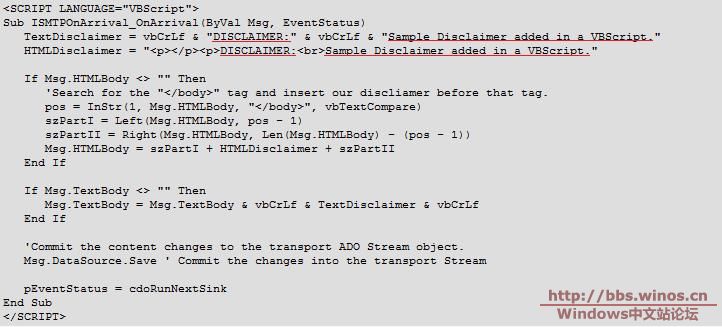
8. 在CMD中浏览到C:\Program Files\Exchange SDK\SDK\Support\CDO\Scripts\,执行以下命令:
cscript smtpreg.vbs /add 2 onarrival SMTPScriptingHost CDO.SS_SMTPOnArrivalSink "mail from=*@your-domain-here.com"
@后边是你要设置的域的域名
cscript smtpreg.vbs /setprop 2 onarrival SMTPScriptingHost Sink ScriptName "C:\EventSinkScript.vbs"
如果此命令成功执行,将收到由脚本生成的成功消息。
要取消注册此事件,请键入以下内容:
cscript smtpreg.vbs /remove 2 OnArrival SMTPScriptingHost

9. 重启Exchange Routing Engine及SMTP服务,测试设置是否成功,如不成功,请仔细检查脚本内容
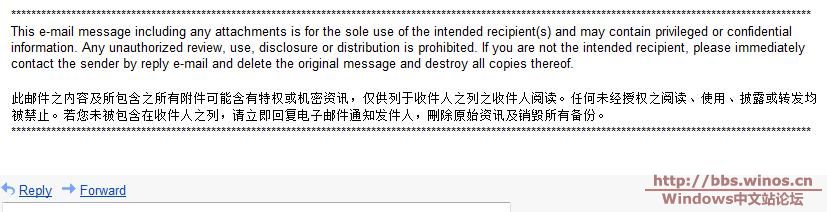
10. 以下脚本是我测试成功的,邮件预览图如下:
<SCRIPT LANGUAGE="VBScript">
Sub ISMTPOnArrival_OnArrival(ByVal Msg, EventStatus)
TextDisclaimer = vbCrLf &
"************************************************************************************************
****************************************************************" & vbCrLf & vbCrLf & "This e-
mail message including any attachments is for the sole use of the intended recipient(s) and may
contain privileged or confidential information. Any unauthorized review, use, disclosure or
distribution is prohibited. If you are not the intended recipient, please immediately contact the
sender by reply e-mail and delete the original message and destroy all copies thereof. " & vbCrLf
& vbCrLf & "此邮件之内容及所包含之所有附件可能含有特权或机密资讯,仅供列于收件人之列之收件人阅读
。任何未经授权之阅读、使用、披露或转发均被禁止。若您未被包含在收件人之列,请立即回复电子邮件通知
发件人,刪除原始资讯及销毁所有备份。" & vbCrLf &
"************************************************************************************************
****************************************************************"
HTMLDisclaimer =
"<p></p><p>**************************************************************************************
**************************************************************************<br>This e-mail message
including any attachments is for the sole use of the intended recipient(s) and may contain
privileged or confidential information. Any unauthorized review, use, disclosure or distribution
is prohibited. If you are not the intended recipient, please immediately contact the sender by
reply e-mail and delete the original message and destroy all copies thereof. </p>此邮件之内容及所
包含之所有附件可能含有特权或机密资讯,仅供列于收件人之列之收件人阅读。任何未经授权之阅读、使用、
披露或转发均被禁止。若您未被包含在收件人之列,请立即回复电子邮件通知发件人,刪除原始资讯及销毁所
有备份。
<br>*********************************************************************************************
*******************************************************************"
If Msg.HTMLBody <> "" Then
'Search for the "</body>" tag and insert our discliamer before that tag.
pos = InStr(1, Msg.HTMLBody, "</body>", vbTextCompare)
szPartI = Left(Msg.HTMLBody, pos - 1)
szPartII = Right(Msg.HTMLBody, Len(Msg.HTMLBody) - (pos - 1))
Msg.HTMLBody = szPartI + HTMLDisclaimer + szPartII
End If
If Msg.TextBody <> "" Then
Msg.TextBody = Msg.TextBody & vbCrLf & TextDisclaimer & vbCrLf
End If
'Commit the content changes to the transport ADO Stream object.
Msg.DataSource.Save ' Commit the changes into the transport Stream
pEventStatus = cdoRunNextSink
End Sub
</SCRIPT>
参考文档:
http://support.microsoft.com/kb/317680/zh-cn
http://support.microsoft.com/kb/273233/
Exchange SDK 下载地址:下载解压并安装
http://www.microsoft.com/downloa ... &displaylang=en
根据KB273233,客户端Outlook使用Exchange模式时使用一般的方法是无法实现的,本文的方法是使用2个SMTP虚拟服务器实现的。(参考自一个老外的Blog)
这个方法的缺点:当发送邮件量很大时,降低邮件服务器的工作效率;
另,在测试时发现免责申明中的中文有时会是?号,没有找到原因,知道的朋友请赐教:michael2046@gmail.com
1. 给服务器添加第二个IP地址
2. 建立第二个SMTP虚拟服务器:“Disclaimer SMTP Server”,选择IP:192.168.1.114
3. 选择默认SMTP虚拟服务器属性-常规,设置使用IP地址:192.168.1.112
4. 选择默认SMTP虚拟服务器属性-传递-高级,在虚拟域中添加IP:192.168.1.114
5. 选择“Disclaimer SMTP Server”虚拟服务器-属性-访问-中继,添加IP:192.168.1.112为允许
6. 新建一个SMTP连接器,选择桥头服务器为“Disclaimer SMTP Server”
7. 根据KB317680,在C盘根目录建立EventSinkScript.vbs文件,脚本内容请根据需要自行更改,但需要注意,下图中TextDisclaimer和HTMLDisclaimer的红线字段必须一样
8. 在CMD中浏览到C:\Program Files\Exchange SDK\SDK\Support\CDO\Scripts\,执行以下命令:
cscript smtpreg.vbs /add 2 onarrival SMTPScriptingHost CDO.SS_SMTPOnArrivalSink "mail from=*@your-domain-here.com"
@后边是你要设置的域的域名
cscript smtpreg.vbs /setprop 2 onarrival SMTPScriptingHost Sink ScriptName "C:\EventSinkScript.vbs"
如果此命令成功执行,将收到由脚本生成的成功消息。
要取消注册此事件,请键入以下内容:
cscript smtpreg.vbs /remove 2 OnArrival SMTPScriptingHost
9. 重启Exchange Routing Engine及SMTP服务,测试设置是否成功,如不成功,请仔细检查脚本内容
10. 以下脚本是我测试成功的,邮件预览图如下:
<SCRIPT LANGUAGE="VBScript">
Sub ISMTPOnArrival_OnArrival(ByVal Msg, EventStatus)
TextDisclaimer = vbCrLf &
"************************************************************************************************
****************************************************************" & vbCrLf & vbCrLf & "This e-
mail message including any attachments is for the sole use of the intended recipient(s) and may
contain privileged or confidential information. Any unauthorized review, use, disclosure or
distribution is prohibited. If you are not the intended recipient, please immediately contact the
sender by reply e-mail and delete the original message and destroy all copies thereof. " & vbCrLf
& vbCrLf & "此邮件之内容及所包含之所有附件可能含有特权或机密资讯,仅供列于收件人之列之收件人阅读
。任何未经授权之阅读、使用、披露或转发均被禁止。若您未被包含在收件人之列,请立即回复电子邮件通知
发件人,刪除原始资讯及销毁所有备份。" & vbCrLf &
"************************************************************************************************
****************************************************************"
HTMLDisclaimer =
"<p></p><p>**************************************************************************************
**************************************************************************<br>This e-mail message
including any attachments is for the sole use of the intended recipient(s) and may contain
privileged or confidential information. Any unauthorized review, use, disclosure or distribution
is prohibited. If you are not the intended recipient, please immediately contact the sender by
reply e-mail and delete the original message and destroy all copies thereof. </p>此邮件之内容及所
包含之所有附件可能含有特权或机密资讯,仅供列于收件人之列之收件人阅读。任何未经授权之阅读、使用、
披露或转发均被禁止。若您未被包含在收件人之列,请立即回复电子邮件通知发件人,刪除原始资讯及销毁所
有备份。
<br>*********************************************************************************************
*******************************************************************"
If Msg.HTMLBody <> "" Then
'Search for the "</body>" tag and insert our discliamer before that tag.
pos = InStr(1, Msg.HTMLBody, "</body>", vbTextCompare)
szPartI = Left(Msg.HTMLBody, pos - 1)
szPartII = Right(Msg.HTMLBody, Len(Msg.HTMLBody) - (pos - 1))
Msg.HTMLBody = szPartI + HTMLDisclaimer + szPartII
End If
If Msg.TextBody <> "" Then
Msg.TextBody = Msg.TextBody & vbCrLf & TextDisclaimer & vbCrLf
End If
'Commit the content changes to the transport ADO Stream object.
Msg.DataSource.Save ' Commit the changes into the transport Stream
pEventStatus = cdoRunNextSink
End Sub
</SCRIPT>
| 自由广告区 |
| 分类导航 |
| 邮件新闻资讯: IT业界 | 邮件服务器 | 邮件趣闻 | 移动电邮 电子邮箱 | 反垃圾邮件|邮件客户端|网络安全 行业数据 | 邮件人物 | 网站公告 | 行业法规 网络技术: 邮件原理 | 网络协议 | 网络管理 | 传输介质 线路接入 | 路由接口 | 邮件存储 | 华为3Com CISCO技术 | 网络与服务器硬件 操作系统: Windows 9X | Linux&Uinx | Windows NT Windows Vista | FreeBSD | 其它操作系统 邮件服务器: 程序与开发 | Exchange | Qmail | Postfix Sendmail | MDaemon | Domino | Foxmail KerioMail | JavaMail | Winwebmail |James Merak&VisNetic | CMailServer | WinMail 金笛邮件系统 | 其它 | 反垃圾邮件: 综述| 客户端反垃圾邮件|服务器端反垃圾邮件 邮件客户端软件: Outlook | Foxmail | DreamMail| KooMail The bat | 雷鸟 | Eudora |Becky! |Pegasus IncrediMail |其它 电子邮箱: 个人邮箱 | 企业邮箱 |Gmail 移动电子邮件:服务器 | 客户端 | 技术前沿 邮件网络安全: 软件漏洞 | 安全知识 | 病毒公告 |防火墙 攻防技术 | 病毒查杀| ISA | 数字签名 邮件营销: Email营销 | 网络营销 | 营销技巧 |营销案例 邮件人才:招聘 | 职场 | 培训 | 指南 | 职场 解决方案: 邮件系统|反垃圾邮件 |安全 |移动电邮 |招标 产品评测: 邮件系统 |反垃圾邮件 |邮箱 |安全 |客户端 |