
当用户启用了EXCHANEG 2003的OWA的表单访问(FBA)后,用户将可以看到一个漂亮的验证页面。默认情况下,用户将可以使用domain\username或username@domain.com两种方式登录。但往往用户希望实现只输入用户名就可以登录。怎么做呢?
我们想到的肯定是去修改IIS管理器里的基本验证后的域名(默认是"\")为你的实际域名,但遗憾的是,修改后只能保留一段时间,一旦重新启动或15分钟后,该设置就会恢复。这是怎么回事呢?
大家如果认真的研究过,就会发现在ESM里也有虚拟目录的配置,如图:
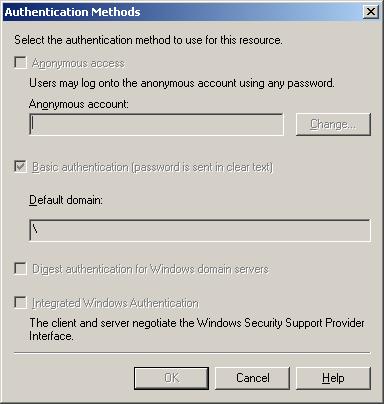
而下面是IIS管理器里的设置。
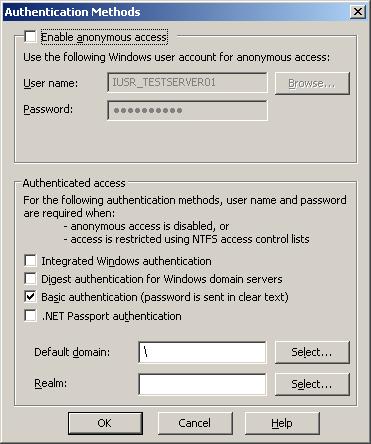
大家可以看到ESM里的设置是灰色的,不可修改的,而IIS里的设置是可改的,而EXCHANGE设计是从ESM(也就是AD里)读取配置到IIS里,因此在IIS里的修改将不能保留。详细情况请参考:
240105 - XGEN: General Information on Directory Service/Metabase Synchronization in Exchange 2000 Server
264941 - XCCC: Changes to Virtual Directory Settings Are Not Maintained
830827 - How to Use Forms Based Authentication with Outlook Web Access Clients in Exchange Server 2003
820378 - Outlook Web Access session unexpectedly quits when forms-based authentication is used
所以IIS里的配置是不能修改的。那么我们要怎么做呢?显然要去修改登录页面。
1、找到OWA的页面文件,在C:\Program Files\Exchsrvr\exchweb\bin\auth\usa (这里是英文版的)如果是中文的,则是对应语言目录。页面文件名logon.asp.
2、找到如下内容:
<% If g_fIsMSIE5Rich Then %>
<BODY scroll="AUTO" bgColor="#3D5FA3" text="#000000" leftMargin=0 topMargin=0>
<FORM action="/exchweb/bin/auth/owaauth.dll" method="POST" name="logonForm" autocomplete="off">
<% Else %>
<BODY scroll="AUTO" bgColor="#FFFFFF" text="#000000" onload="window.document.logonForm.username.focus()">
<FORM action="/exchweb/bin/auth/owaauth.dll" method="POST" name="logonForm">
<% End If %>
3、将其中的<FORM action="/exchweb/bin/auth/owaauth.dll" method="POST" name="logonForm" autocomplete="off">替换成以下脚本:
<script Language=javascript>
<!--
function logonForm_onsubmit()
{
if (logonForm.username.value.indexOf("@") !=-1)
{
return true;
}
logonForm.username.value = "NetBIOS domain here\\" + logonForm.username.value;
return false;
}
//-->
</script>
<FORM action="/exchweb/bin/auth/owaauth.dll" method="POST" name="logonForm" autocomplete="off" onsubmit="logonForm_onsubmit()">
NOTE:
这里的NetBIOS domain here要替换成你的域名的简格式,如果域叫ABC.COM,则写成ABC。
4、继续寻找该文件的第20行的以下内容:
CONST L_UserName_Text = "Domain\username:"
将其中的"Domain\"删除,同时也将24、25、26行的同样内容删除。
修改后的界面:
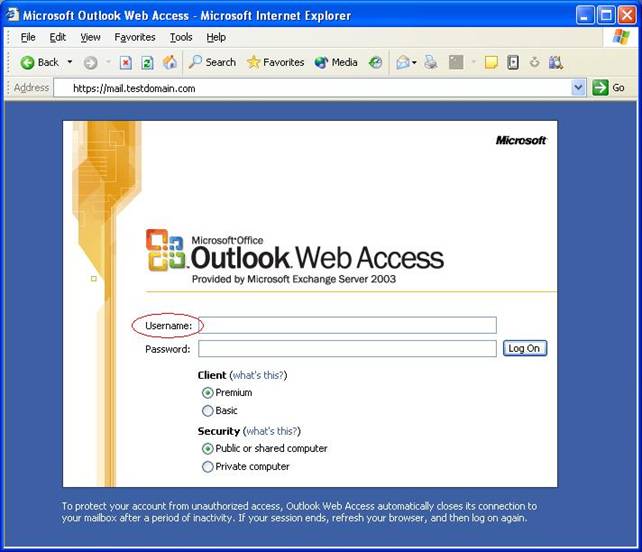
如果你使用上述代码后登录出现问题,也可以使用下面的两段代码:
1.
<script type="text/javascript" language=攋avascript?gt;
function logonForm_onsubmit() {
var userName=logonForm.username.value;
if (userName.indexOf("@") !=-1)
return true;
else if(userName.indexOf("\\") !=-1)
return true;
else{
logonForm.username.value = "YOUR_DOMAIN_NAME\\" + userName;
return true;
}
}
</script>
<form action="/exchweb/bin/auth/owaauth.dll" method="POST" id="logonForm" autocomplete="off" onsubmit="logonForm_onsubmit()">
2.
<script Language=javascript>
<!--
function logonForm_onsubmit()
{
if (logonForm.username.value.indexOf("NetBIOS domain here\\") !=-1) { return true; ]
if (logonForm.username.value.indexOf("@") !=-1)
{
return true;
}
logonForm.username.value = "NetBIOS domain here\\" + logonForm.username.value;
return false;
}
//-->
</script>
<FORM action="/exchweb/bin/auth/owaauth.dll" method="POST" name="logonForm" autocomplete="off" onsubmit="logonForm_onsubmit()">
另外要注意的是安装补丁或SP有可能删除或重新安装登录页面。请注意备份。,