
诺记的N-GAGE是英文机型,而且在国内的专卖店并无售卖过,很多用户都不知道一些功能怎么使用,现在我就说明一下用N-GAGE收发电子邮件和WAP上网设置。
N-GAGE上网设置:
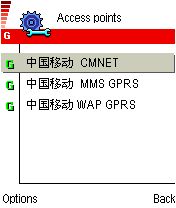
进入Tools/Settings/Connection/Access points/Options/Edit设置。
中国移动 CMNET设置:用于浏览互联网(需软件支持)
Connection name写/中国移动 CMNET
Data bearer选择GPRS
Access point name写cmnet
User name不需设置
prompt password选择NO
Password不需设置
Authentication选择Normal
Gateway IP address设置成0.0.0.0
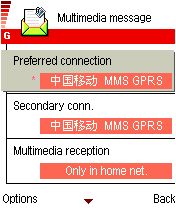
中国移动 MMS GPRS设置:用于收发MMS彩信
Connection name写:中国移动 MMS GPRS
Data bearer选择GPRS
Access point name写成cmwap
User name不需设置
prompt password选择NO
Password不需设置
Authentication选择Normal
Gateway IP address设置成10.0.0.172
Homepage设置成/http://mmsc.monternet.com
Connection security选择off
Session mode选择Permanent
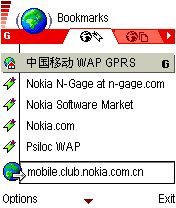
中国移动 WAP GPRS设置:用于浏览移动WAP网
Connection name写:中国移动 WAP GPRS
Data bearer选择GPRS
Access point name写成cmwap
User name不需设置
prompt password选择NO
Password不需设置
Authentication选择Normal
Gateway IP address设置成10.0.0.172
Homepage设置成/http://wap.monternet.com
Connection security选择off
Session mode选择Permanent
收发电子邮件设置:
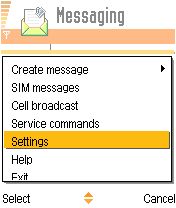
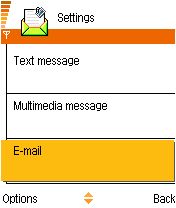
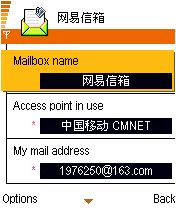
首先进入“Messaging”按“Options”选择“Settings”,再选择E-mail,然后对照上图设置。
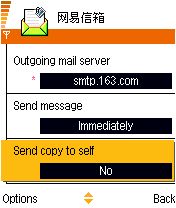
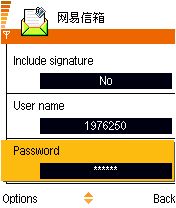
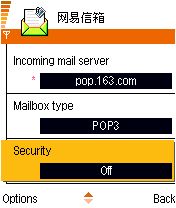
注意邮件收/发服务器的设置,以及“Security”设为Off。